


Web Design Guidelines That Improve User Experience and Accelerates Business Growth – Pixelcarve
Why Following Web Design Guidelines Matters for Your Site


You know the pain: visitors land on your page and leave before you even register a click. That friction costs you leads, customers, and revenue. In fact, 38% of users will abandon a website if they find its layout unattractive.
Web design is not just about aesthetics. It shapes how users think, feel, and act when they interact with your brand online. As Curtis Priest, CEO of Pixelcarve, puts it:
“Your website should feel effortless to navigate – ditch the clutter, make it lightning-fast and nail the mobile experience. Design with your audience in mind, using data to understand what they actually want.”
In 2026, following web design guidelines is a business necessity. Strong design improves engagement, boosts conversions, and ensures your brand delivers a seamless experience across devices.
In this article, we’re going to cover:
- Clear tips for website design that improve user engagement.
- Proven best practices that align design with business goals.
- Responsive web design guidelines to ensure performance on any screen.
By the end, you’ll see how applying the right design principles can transform your website from a passive presence into a powerful driver of business success.
Set a Clear Purpose Using Web Design Guidelines
You cannot design effectively if you don’t know who you are designing for and why. A clear purpose sets the direction for every choice you make, influencing layout, content, visuals, and navigation. Purpose is the anchor that keeps your design aligned with business outcomes such as lead generation, product inquiries, or customer engagement.
When you define purpose, you map the journey your visitors should take. You know what to highlight and what to remove. Purpose ensures your site avoids clutter and instead guides users toward meaningful actions.
For example, an attorney firm site may aim to generate consultations. That purpose translates into design choices such as:
- Placing contact forms prominently and early.
- Showcasing attorney bios to build trust.
- Using layouts that guide visitors toward booking an appointment.
Without purpose, a site becomes a jumble of competing messages. With purpose, every pixel supports your goals. Today, these choices are central to web design because users expect clarity before anything else. Your design should immediately reassure them: “You are in the right place.”
| Give Your Brand A Website That Feels Premium! Level up your visual design, structure, and messaging with guidance built for serious brands that expect measurable impact.. Build My High-Performing Site |
Website Design Best Practices for Building Engaging Content
Content (information) is the reason people come to your site. It informs, educates, and converts. Strong content works in harmony with design, while weak content undermines even the most polished layouts.
1. Start With Clarity
Use language your audience understands. Avoid jargon that confuses or distracts. Your text should guide users toward action with:
- Headlines that grab attention.
- Subheads that explain value.
- Paragraphs that deliver on your promises.
2. Align With SEO and User Intent
Search engines read your content too. Simple SEO practices help your pages rank and reach the right audience.
- Use keywords naturally.
- Build meta titles and descriptions that reflect user intent.
- Write copy that answers the questions your customers actually ask.
This way, you align both audience logic and design logic for maximum impact.
3. Organize Content as a Journey
Think of your pages as paths, not walls of text. Every sentence should lead somewhere. Every paragraph should help your visitor understand, feel, or act. Organized content keeps users engaged and moving toward conversion.
4. Place Content Where Eyes Land Most
Design and content placement go hand in hand. Use proven web design tips to ensure your message is seen:
- Headlines above the fold.
- Clear benefits highlighted early.
- Answers to common questions positioned where users expect them.
You must be strategic with content. As Curtis Priest says, don’t just place your CTA – stage it! Like the climax of a great movie
These practices turn curious visitors into loyal customers. When your content guides users well, your visuals gain context, creating a seamless experience where design and words reinforce each other.
| More articles you might like: The Importance of Website Security The Hidden Cost of Neglecting Your Website Website Structure Analysis: How to Visualize your New Website |
Use Visuals Strategically and Follow Web Design Layout Guidelines
Visuals are more than decoration; they are signals. They direct attention, highlight what matters, and guide visitors toward action. When used strategically, visuals increase engagement and make your site feel dynamic and alive.
1. Hero Images That Capture Attention
A strong hero image sets the emotional tone immediately. It communicates value without heavy text and establishes relevance.
Choose imagery that reflects your audience authentically, rather than generic stock photos. Today, attention is earned by visuals that feel real and connected.
2. Purposeful Motion and Interactions
As Curtis Priest puts it “Your website might be costing you conversions, and it’s not the design. It’s the lack of motion.”
Animations and micro‑interactions add subtle motion that clarifies what is clickable versus static. They enhance usability and keep visitors engaged. But every visual must serve a purpose. Too many moving parts distract from your core message and dilute clarity.
3. Reinforce Brand Identity
Your visuals should consistently reflect your brand. Use cohesive color tones, well‑chosen graphics, and authentic photos of your team or products to build credibility. Keep file sizes optimized so pages load quickly, ensuring performance matches design quality.
4. Layout and Visual Synergy
Layout and visuals work together to guide the reader’s eye. Group elements logically, use spacing to create breathing room, and maintain consistency so visitors never feel lost.
When visuals and layouts align, they create designs that feel credible, professional, and trustworthy, turning your website into a powerful extension of your brand.
“Conduct usability tests periodically to identify pain points. Then, you can implement new design trends that improve user engagement and accessibility. Make sure your site is optimized for mobile access so users have a seamless experience across all devices..”
Curtis Priest, President & CEO, Pixelcarve
Organize Navigation With Responsive Web Design Guidelines
Navigation is your site’s GPS. It shows users where they are and where they can go next. If navigation is confusing, users leave. Simple menus and clear pathways help visitors find answers fast and stay engaged.
1. Responsive Navigation Across Devices
Responsive design ensures your navigation adapts seamlessly to every screen. On the desktop, menus may spread across the top. On mobile, they often collapse behind a hamburger icon. Regardless of format, the goal remains the same: users should reach what they want in three taps or less.
2. Clear Labels and Pathways
Good navigation uses labels that make sense to your audience. Stick to familiar terms like “Services,” “About,” or “Contact” instead of creative but unclear wording. Internal links should guide users deeper into your content, while dropdowns must be used wisely to avoid clutter. Navigation should feel like directions, not obstacles.
3. Visual Cues for Orientation
Design cues such as contrast, hover states, or active highlights help users know exactly where they are. These subtle signals reduce confusion and build confidence as visitors move through your site.
4. Consistent Branding Across Screens
Colors, fonts, and icons should match the rest of your design across all devices. This cohesion builds trust and reinforces brand identity. Strong responsive web design guidelines emphasize consistency as a cornerstone of credibility.
49% of customers leave websites that are confusing or hard to navigate. Today, users bounce quickly if navigation feels fragmented. You want them to explore, not exit. Solid navigation is the foundation that leads naturally into thoughtful choices about typography, colors, and spacing, ensuring your site feels both intuitive and professional.
Web Design Guidelines 2026: Typography, Colors, and White Space in
Typography gives voice to your text. The fonts you choose tell visitors how to feel about your message. Simple, readable fonts work best for body text, while stylized fonts should be reserved for headings or accents. Above all, clarity must never be compromised.
Colors shape perception and mood. Choose palettes that reflect your brand personality and feel intentional. Pair bold hues with neutrals so nothing competes for attention. Balanced color choices create harmony and reinforce brand identity.
White space is not wasted space — it is focus. It prevents overwhelm, helps users scan content, and establishes hierarchy. Without space, design elements blur together and lose meaning.
Apply spacing rules consistently:
- Group related elements together.
- Separate unrelated elements.
- Build a rhythm that feels natural to the eye.
When typography, color, and space work together, your design feels polished and purposeful. These fundamentals are central to website design guidelines because they ensure readability, comfort, and clarity for every visitor. Good design that follows these basics builds trust and positions your brand as reliable and confident.
Best Website Design Practices to Build Trust and Authenticity
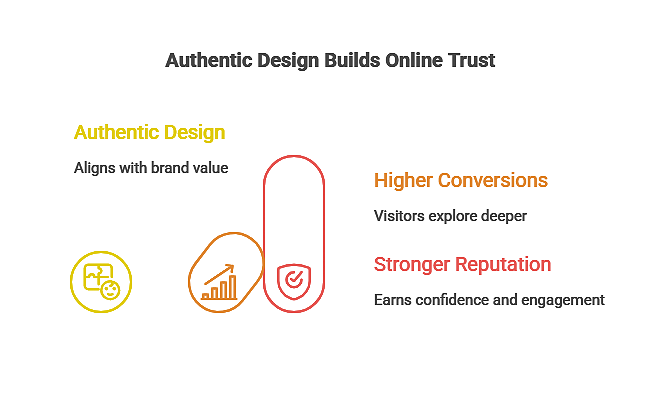
Trust online is earned in milliseconds with 94% of first impressions are related to design. Visitors judge your brand before they read a single sentence, and your site’s authenticity signals whether you are credible or uncertain.
Honest branding means clear messaging. Don’t promise what you cannot deliver. Avoid generic stock testimonials. Instead, showcase real names, real outcomes, and real stories. Your visuals, content, and layout must align with who you truly are.
Overhyped visuals or exaggerated claims create friction. Today’s visitors are savvy; they can sense when words and visuals don’t match reality. Authentic design earns confidence and invites engagement.
Practical ways to build authenticity include:
- Featuring your team and showing real clients.
- Using language that speaks to your audience’s actual needs.
- Designing with a human‑centered approach that prioritizes honesty and relevance.
When your design aligns with your actual value, visitors stay longer, explore deeper, and convert more often. Trust built through design leads directly to higher conversions and a stronger reputation.
Test and Refine Using Your Web Design Guide
No design is perfect on the first try. The most effective websites are built through testing and refinement. Analytics reveal what works and what doesn’t, showing where users click, how far they scroll, and where they exit. These signals provide the roadmap for improvement.
1. Experiment With Variations
Refinement means experimenting with layout changes:
- Try different button positions.
- Shift headlines for clarity.
- Swap images to test relevance.
Each variation teaches you more about your audience. The key is to measure results, not guess.
2. Use A/B Testing for Data‑Driven Decisions
A/B tests compare versions of a page to track improvements in engagement or conversions. Even small changes — like a headline tweak or a new call‑to‑action button, can yield big results when guided by real data.
3. Define Success Metrics
Your web design guide should outline how success is measured. Common metrics include:
- Bounce rate (how quickly users leave).
- Time on page (how long they stay engaged).
- Form submissions (how often they convert).
Tracking these metrics ensures each iteration moves your site closer to business goals.
4. Continuous Refinement for Relevance
Web design is never static. Continuous refinement keeps your site aligned with evolving user expectations, ensuring it remains competitive and relevant. Successful design grows alongside your business and adapts to audience needs.
Matching Web Design Patterns to Business Goals
This table helps you decide which design pattern fits specific business goals. This is a practical insight many guides overlook.
Every business goal demands different design focus areas. Use this table to match design strategies to outcomes you care about.
| Business Goal | Design Focus | Why it Matters |
| Generate Leads | Clear CTAs, minimal distractions | Leads convert when actions are obvious |
| Increase Engagement | Interactive visuals and thoughtful layout | Keeps users exploring deeper content |
| Build Authority | Trust signals like testimonials and real stories | Helps users believe in your brand |
| Sell Products | Strong product pages and easy checkout | Reduces friction in decision-making |
| Boost Mobile Traffic | Responsive menu and touch-friendly UI | Mobile users expect fast and easy navigation |
These connections show how simple design choices support business outcomes. Use this as a practical tool the next time you plan a redesign.
Pixelcarve Leads Web Design Success
Following smart web design guidelines transforms how your website performs. You’ve seen how purpose guides layout, how content engages users, and how visuals shape perception. You’ve learned why navigation and responsiveness keep visitors moving, why authenticity builds trust, and why testing fuels continuous improvement.
With 27 years of experience and partnerships with Fortune 1000 companies, Pixelcarve has proven expertise in creating design systems that deliver measurable results. We know how to blend disciplined standards with creative execution so your website doesn’t just look good but brings tangible results for your business.
Contact us today. Let’s build a site that engages users, earns trust, and drives outcomes that matter.
- Website Maintenance Checklist Every Premium Site Needs in 2026 – Pixelcarve
- Top Down vs Bottom Up Designs and What They Mean for You – Pixelcarve
- The Ontario WordPress Advisory Is a Good Reminder: Websites Need Ongoing Care
- Website Maintenance Cost Guide for Small and Large Sites – Pixelcarve
- How Much Does a Website Cost? The Real Price of Great Design – Pixelcarve
